By Simon Scheibel, CEO & Founder, UniMeasureAI ApS
Kiwi Sizing Alternatives: Size Charts vs Camera-Based Measurement
A fair comparison of Kiwi Size Chart & Recommender and UniMeasureAI for Shopify stores: how each sizes shoppers, published pricing, and which fits your product range.
Kiwi Size Chart & Recommender combines size charts with several types of size recommender for Shopify. If you are looking at alternatives, the useful question is not "which app is better" but "what kind of sizing input does my product range need?"
What Kiwi Sizing does
According to its Shopify listing, Kiwi lets merchants import size charts from images, product descriptions or CSV, build product- or collection-based size guides, convert units based on the shopper's location, and add AI-powered size recommendations.
Kiwi is not only a static size chart. Its recommender guide, reviewed on October 22, 2026, distinguishes basic apparel recommendations using entered measurements, advanced apparel estimates using basic shopper details, and configurable custom recommenders. These are different inputs from guided camera capture.
Kiwi's published monthly plans are:
- Free — up to 3 published size charts, with a Kiwi watermark.
- Premium, $7.99/month — up to 10 size charts, advanced layouts, Google Analytics integration, no watermark.
- Plus, $14.99/month plus usage charges based on order volume — up to 20 size charts and up to 10 custom size recommenders.
- Ultimate, $26.99/month plus usage charges — unlimited size charts and recommenders, translation into 22 languages.
Paid plans include a 14-day free trial, and Kiwi notes that image and URL import credits are sold separately.
How UniMeasureAI is different
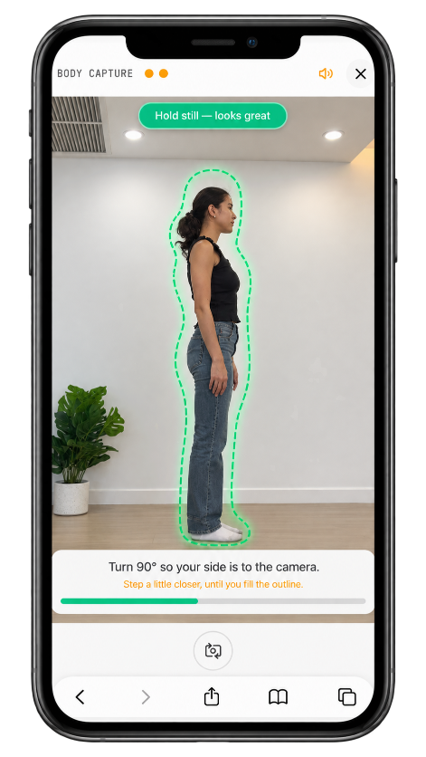
UniMeasureAI starts from a different input: the shopper's actual measurements. Instead of reading a chart or answering questions, the customer uses their own phone, tablet or laptop camera to capture body, foot, head or hand measurements in the browser. Those measurements are compared with the size chart you uploaded for that product, and the shopper gets a size recommendation. You can read the full step-by-step flow.
UniMeasureAI is available as a Shopify app and through direct API integration for other platforms. Plans run from a free 30-day trial room with up to 25 measurements to paid plans from $49/month; see pricing for limits and which measurement types each plan includes. Size table uploads are unlimited on every plan.
Side by side
| Kiwi Sizing | UniMeasureAI | |
|---|---|---|
| Main sizing input | Size charts and size recommenders | Camera measurement of the shopper |
| Size charts | 3 to unlimited, depending on plan | Unlimited uploads on every plan |
| Pricing basis | Monthly plan; Plus and Ultimate add order-volume usage charges | Monthly plan with an included number of measurements |
| Starting price | Free; paid from $7.99/month | Free 30-day trial room (up to 25 measurements); paid from $49/month |
| Platforms | Shopify | Shopify app and API |
Which fits your store?
A size chart app like Kiwi may be enough when your customers already know their measurements, when your range is simple, or when your main goal is clear, well-designed size charts across many products at a low monthly cost.
Camera-based measurement is worth considering when shoppers don't know their own measurements — which is common for footwear, helmets and headwear, gloves and made-to-measure — or when you need measurements, not just a size, before an order can be produced.
The two approaches can also sit side by side: a size chart for shoppers who know their numbers, and a measurement option for those who don't.
Want to see the measurement flow on a real store? Get in touch or try the free 30-day trial room.
- Kiwi Sizing alternatives
- Shopify size chart app
- Size recommendation app
- Camera-based measurement