By Simon Scheibel, CEO & Founder, UniMeasureAI ApS
UniMeasureAI vs 3DLOOK, Easysize, WAIR, Shaku and Sizekick: Sizing Tools Compared
Compare six sizing tools by shopper inputs, measurement outputs, apparel recommendations and tailoring use cases, with official sources and clear limits.
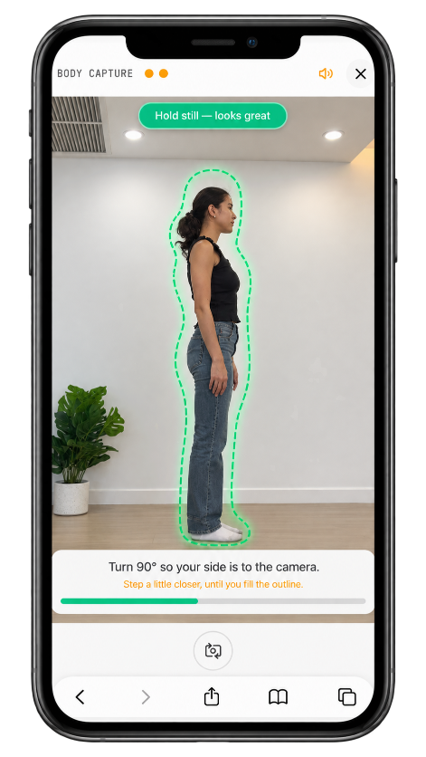
Camera-based tools also use algorithms. The useful distinction is what a shopper supplies, whether the tool generates measurements or directly recommends a size, and how that output connects to a merchant’s products. A questionnaire-based recommendation is not the same as capturing body measurements from photos.
Sizing tools compared by inputs and outputs
| Provider | Shopper inputs | Measurement output | Apparel size guidance | Tailoring use case |
|---|---|---|---|---|
| 3DLOOK Mobile Tailor | Two guided smartphone photos; the made-to-measure page also lists gender, height and weight | Body measurements and a body model | Retail integration is described; exact recommendation scope depends on the product | Made-to-measure body measurement |
| Easysize Fit Quiz | Questions about sizing and fit; the service also uses merchant and shopping data | No shopper camera measurement capture; its reviewed FAQ says body measurements are not required | Personalized size recommendations for clothing and shoes | Not stated on the reviewed page |
| WAIR | Simple shopper inputs and contextual data; individual fields are not listed on the reviewed page | Predicted body dimensions, not camera capture | Apparel size recommendation | Not stated on the reviewed page |
| Shaku | Two guided photos and height | Body measurements and a measurement profile | Size-chart matching and recommended sizes | Yes — remote measurement for custom clothing is described; exact service scope should be confirmed |
| Sizekick | BodyFinder shape selection or BodyScanner smartphone video capture | Individual body measurements | Personalized clothing-size recommendation | Not stated on the reviewed page |
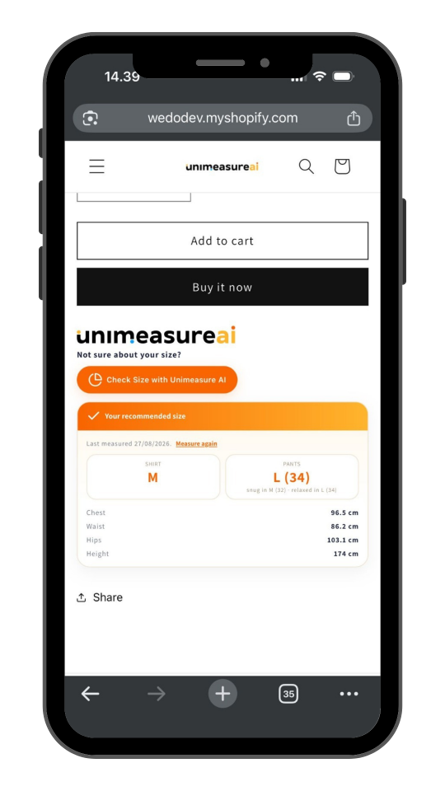
| UniMeasureAI | Guided browser-based camera capture for the selected category | Body, foot, head or hand measurements, according to the configured workflow | Matching to merchant-configured product or category charts | Body measurement collection for made-to-measure workflows; the tailor retains production and fit decisions |
The reviewed apparel pages do not establish each competitor’s hand, head or footwear measurement capabilities. We do not mark those features as absent. Likewise, supporting several brands is not proof that a shopper’s saved profile travels between unrelated stores.
What the official sources describe
3DLOOK: Mobile Tailor describes measurements from smartphone photos. Its made-to-measure page explains a tailoring use case and retail measurement collection. Its separate FitXpress page discusses fitness uses; that is not evidence of the same features in every 3DLOOK product.
Easysize: Its FAQ and Fit Quiz algorithm explanation describe recommendations from shopper answers and other data, without requiring body measurement capture. Its Shopify listing covers clothing and shoes. Recommending apparel sizes must not be mistaken for photographing and measuring the body.
WAIR: The size-and-fit page describes predicted body dimensions and size recommendations from simple inputs and context. See also the Shopify listing. The precise shopper input fields are not enumerated on the reviewed product page.
Shaku: Its website describes two photos and height, body measurements and chart matching. Its services page and custom-made clothing article describe remote measurements in tailoring contexts. This corrects the earlier negative tailoring classification; confirm the scope for a particular bespoke workflow. The consumer app is a separate offering.
Sizekick: Its product announcement distinguishes BodyFinder shape selection from BodyScanner smartphone video. Its Shopify app page describes measurements and clothing recommendations. See the Shopify listing for current installation details.
Where UniMeasureAI fits
UniMeasureAI combines four measurement categories with merchant-configured sizing charts: AI clothing size recommendations, foot measurement and shoe sizing, hand measurements for gloves, and head measurement for helmets and hats. Available workflows depend on the plan and configuration.
Multi-brand ecommerce requires the merchant to configure the relevant brand or product charts. We are not claiming automatic matching to every brand or reuse of a saved profile between independently operated stores: cross-store profile persistence and consent have not been verified for this comparison.
For remote measurements for made-to-measure clothing, body measurements are inputs to the tailor’s process, not finished garment measurements or pattern dimensions.
How to choose for your store
Check the required shopper inputs, available measurement fields, product-chart setup, privacy handling and integration scope. A questionnaire may be appropriate when a size recommendation is the main goal; guided camera capture can be relevant when measurements are needed too. Neither approach guarantees fit, and camera-derived measurements are also algorithmic outputs.
Read virtual fitting rooms vs AI size recommendations, explore AI size recommendations for Shopify, or discuss a body measurement API integration. Compare plans and ask about your product requirements.
- Sizing tool comparison
- 3DLOOK alternatives
- Easysize alternatives
- Camera-based measurement