Virtual Fitting Rooms vs AI Size Recommendations: What’s the Difference?
A merchant’s guide to size charts, questionnaire-based and camera-based size recommendations, and visual virtual try-on — what each does and what to check.
“Virtual fitting room” is a broad vendor term, not a precise description of one feature. Before choosing a tool, ask whether it displays a chart, recommends a size, or generates a visual representation of a shopper wearing a product. Those outputs answer different questions.
Size charts: the merchant’s sizing reference
A size chart connects product size labels with measurement information. A shopper compares the chart with measurements they know or collect. Good charts clarify units and whether values refer to a body or a garment. A chart alone does not capture measurements or generate an image of a shopper wearing clothing.
For a multi-brand store, charts may differ by brand, category and product. A medium in one range does not establish the right size in another. See AI clothing size recommendations and apparel chart matching.
Size recommendations: help choosing a label
A size advisor or fit finder suggests a product size from shopper inputs. Questionnaire-based services can use answers about height, weight, body type, past purchases or fit preferences; the exact inputs vary by provider. Some also use merchant purchase and return data.
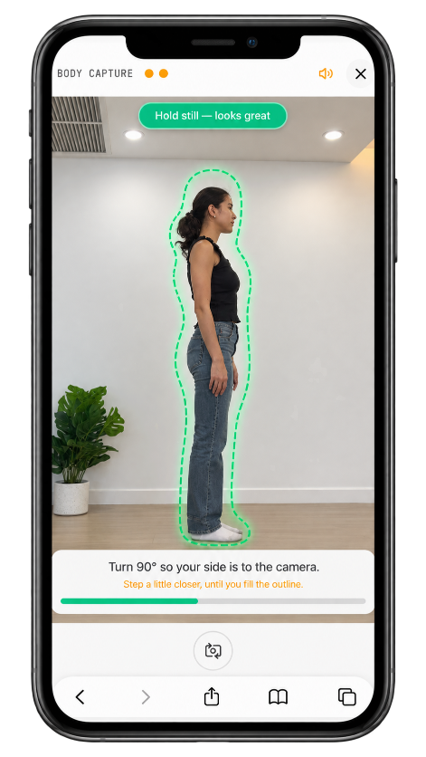
Camera-based services use guided photos or video to derive measurements, then apply their sizing logic. Camera tools use algorithms too: “camera versus algorithm” is not a useful technical divide. Ask which measurements are produced and whether recommendations use your own chart.
UniMeasureAI uses guided browser-based camera capture for body, foot, head or hand workflows and matches the relevant measurements to merchant-configured charts. Capture requirements vary by category. It does not automatically know every brand’s fit without merchant setup. Explore camera capture, measurement generation and size-chart matching.
Visual virtual try-on: showing an appearance
Visual virtual try-on creates or overlays a depiction of a shopper wearing a product. Depending on the vendor, it may involve generated images, augmented reality or another visual method. Showing appearance is different from supplying measurements or establishing that a particular size fits.
UniMeasureAI is positioned around measurements and size-chart-based recommendations. It does not claim to generate images of shoppers wearing garments or offer AR try-on. A camera capture guide is not a visual try-on image.
What should a merchant ask?
- What must the shopper supply: known measurements, answers, photos or video?
- Does the output contain measurements, a size label, a visual image, or a combination?
- How are product and brand charts configured?
- Which measurement categories are supported on the selected plan?
- Where are photos processed, and which data is transmitted or retained?
- What happens when the measurements do not support a confident recommendation?
- Which integration and development work is included?
None of these approaches is a guarantee of fit or a substitute for product-specific fitting instructions. Made-to-measure businesses should also distinguish body measurements from finished garment dimensions, patterns and fit allowances.
Choose the output your customers need
If shoppers already know their measurements, a clear chart may be sufficient. If choosing a size is the main uncertainty, a recommendation tool may help. If the goal is seeing how a garment looks, investigate visual try-on as a separate capability rather than assuming a size recommender includes it.
See AI size recommendations for Shopify and the sourced comparison of UniMeasureAI, 3DLOOK, Easysize, WAIR, Shaku and Sizekick. For measurement-led tailoring, read about remote body measurements for made-to-measure clothing, or discuss your requirements.
- Size recommendations
- Virtual fitting rooms
- Shopify sizing